

| |
 |  |  |  |  |  |
 |
| |||||||
|
Welcome to Mazdaspeed Forums . You are currently viewing our boards as a guest which gives you limited access to view most discussions and access our other features. By joining our free community you will have access to post topics, communicate privately with other members (PM), respond to polls, upload content and access many other special features. Registration is fast, simple and absolutely free so please, join our community today! If you have any problems with the registration process or your account login, please contact contact us. *When you join MSF as a registered user, there will be No Ads. *Registered Members get access to the Off Topic Area of the Forum *Registered Members have an opportunity to upgrade their accounts to VIP, which brings a host of goddies for supporting MSF such as Raffles, Additional Forum Access, More PM Storage, The ability to upload more Images and many other enhancements. *Registered members also get access to the live chat box! |
 |
| |  | LinkBack | Thread Tools | Search this Thread | Display Modes |
 |  06-09-2012, 01:47 AM
| #1 |  |
  Join Date: Sep 2011 Location: Secaucus, NJ
Posts: 180
(View Stats)
iTrader: (6)
Rep Power: 0   Thanks: 131
Thanked 225 Times in 93 Posts
Groans: 0
Groaned at 0 Times in 0 Posts
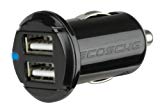
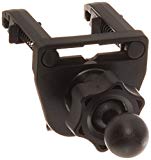
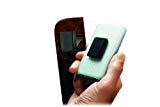
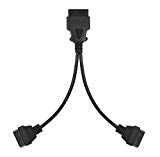
(Thread Starter) |   Not Ranked : 0 score Not Ranked : 0 score  How To: Mounts, Charger and Cable Routing How To: Mounts, Charger and Cable Routing While I did this in a genpu, this may still generally work for a genwon, but your mounting locations will likely be a bit different. One of my primary objectives was to avoid drilling any holes or going through a bunch of work fabricating something. The littlebittafail (A word of warning): I went hulk on the clip that holds the hood release to the lower dash when I was getting frustrated with it. Yeah, I busted it. Fortunately, it doesn’t just fall off when I put it back - I have to pull straight out with a good deal of force to get it to come off, but it does come off if I’m not a little careful when popping the hood. I also broke part of the ring around the push pin holding the left kick-plate in place. I barely put any pressure on the thing… ...Just be careful with these things, as I wasn't. Now that that’s over with… The main thing leading me to start this post was removing the ugly-ass cables routed across my lap (AP) and the control console (phone charger). I was really tired of looking at this: To reroute the USB charger/cable, I first needed to get the charger itself out of site. I decided to use the accessory port in the center console (do genwons have this?). The charger itself could not be too bulky, since it’d get in the way of the tray that sits on top, and I actually use the tray for change and what-not. I looked around and found this: While I don’t have an Ipad, or anything that requires 2.1A, I wanted to future proof. Plus, I wanted the dual ports so I can store another loose cable, already connected, to charge my work phone, ecig battery, or whatever else can charge from USB, on demand. As you can see, this thing is very compact (sticks out of the socket maybe ¼”) and easily charges both my Droid X and work Blackberry at the same time. This car charger is fairly new. It wasn’t too long ago I bought the Scosche Revive II. While it has served me well, it is obnoxiously large, and its specs are not even as good as their new model linked above. *One thing to note: the accessory port in the center console is always-on. So, even if your car is fully off, if you leave something plugged in, it’ll be draining your car battery. The charger itself also has an LED on it that, while it is a minute amount, will draw power all the time while plugged in. You should remove the charger if your car is going to sit for an extended period.* Charger *Shameless Nu-Breath shot* Next, I needed a cable that would reach where I have my phone mounted. I decided to route this down through the e-brake slot (to avoid drilling holes), to the left of the shifter along the floor, under the dash and up through the steering column. Any excess cable is easily hidden behind the carpet and right kick plate. I tied off the cable behind all the e-brake gear to ensure it’s not going to jam anything up, or have a hole rubbed into it. Now, it’s much less common for a cable to fail outright. It’s usually the connectors that are beat up and, most often, the one that’s plugged and unplugged all the time. Instead of buying a long Type-A to Micro-B cable, I decided to get a USB extension cable so that I could swap out the phone side (the side that’s most likely to be unplugged/plugged more often) should I need to. This will hopefully avoid having to reroute the entire cable someday when the connector goes bad or when the connector type changes. Plus, it was actually cheaper to go this route and get a higher quality cable. In case you are wondering, I use the phone holder from the official car mount for the Droid X. It uses the Garmin-sized socket so can attach it to any Garmin-sized ball. I purchased a vent mount that uses such a ball. I bought a spring-loaded model and find that is hangs onto the vent much better than the gator-clip style mounts. I’m not sure if this would work on the genwon vents. Routing the USB Cable The next cable to be routed was the AP cable, but first, I needed to figure out how and where I wanted to mount it. I didn’t want to use a cell phone mount, I already have one of those, and I don’t want anything suction cupped to my windshield. An aggressive search on Amazon brought me to I understand that Velcro will do the same thing as this. While that may be true, it’s fugly IMHO and will likely need replaced eventually. This thing looks much cleaner I think, will never need replaced and makes it very easy to mount/unmount the AP. It also comes with a vent mount if you want to go that direction. I chose to stick it right above my ‘1’ preset button (see the very first pic). It is in perfect view, easily accessible and I can see both the AP and my phone at a glance. Plus, when my AP is not there, it blends in pretty well with the rest of the interior. The other side of this sticks to the back of your device. I wouldn’t want to do this with a phone that I carry in my pocket all the time, but for the AP it’s perfect and unobtrusive. AP Mounting Plate Now, I needed to consider one more thing before routing the AP cable. I use the Android app Torque for my general, everyday monitoring. Torque uses a Bluetooth adapter connected to the OBD II. I wanted to be able to have the AP and/or the Bluetooth adapter hooked up at any time without any hassle. There are a few threads out there on using an OBD II y-splitter to connect both the AP and DH… that’s actually how I discovered that the y-splitter exists. But, I haven’t invested in an OBD II on/off switch, and likely won’t, so I needed to be able to disconnect the Bluetooth adapter easily in case I leave my car sit for a long period of time. So, I bought the splitter, pulled the OEM OBD II connector from its mounting location and jammed one of the y-splitter connectors in its place. I tried to cut a notch into the connector so it would stay in place fairly solid, but I found when my car sat in the sun and the cabin heated up, it popped out pretty easy. No biggy, when the Bluetooth adapter is connected, I just let it hang into the cubby hole, and when it’s not, I shove it back into the stock OBD II location so it’s out of the way. This is the Bluetooth adapter I bought - I remember it being much cheaper at the time: ELM327 Bluetooth OBD-II Wireless Transceiver Dongle - Free Shipping - DealExtreme This thing took forever to arrive (3 weeks) coming from China. But it was the cheapest I could find at the time and there were reviews on the site claiming that it worked fine with Torque. One thing I found, though, is once I connected it to the y-splitter, I can no longer operate Torque in ‘fast mode’. Not a huge deal since I don’t attempt to log with it, but I may try a different adapter at some point to see if it’ll work better with the splitter. There are several on Amazon now that are around the same price or cheaper. Y-Splitter : Y-Splitter and Bluetooth Adapter Various mounting, cable routing, y-splitter threads, I came across;FYI: http://www.mazdaspeedforum.org/forum/foru...-easier-54171/ http://www.mazdaspeedforum.org/forum/foru...-mount-103610/ OBDII AP cable install From there, I did basically what those other threads show; Routed the AP cable under the dash, zip tying in place, and up through the steering column. I keep it in place up top by running it through the part of the panel that holds the push-start button. AP Cable When I'm not using the cables, they tuck away nicely into the steering column. Tada! A littlebittafail, but a wholelottawin. Hope this helps someone. *PS: Unfortunately, you cannot use Torque and the AP at the same time. As soon as you start viewing data on the AP, Torque stops working (mostly), as expected. Mostly meaning, the built-in PIDs that Torque comes with will update every 2-5 seconds(RPM, Temps, etc), but the custom Gen2 PIDs provided by Matt Jackson's plugin start giving wildly erratic values. I've seen 29+ KR  . Beat that! Regardless, I turn off Torque while I'm logging, just in case it affects the other way around (I haven't seen evidence of that). . Beat that! Regardless, I turn off Torque while I'm logging, just in case it affects the other way around (I haven't seen evidence of that).
__________________ 2011 Liquid Silver Metallic MAZDASPEED3 -Traded... Cobb AP | Autotech Internals | UR Catted DP | UR Resonated TP | UR CBE | Cobb TIP | CP-E Xcel Nano | CP-E RMM | JBR TMM & PMM | JBR OCC S2 | JBR SSP S2 | JBR EGR Delete | NGK Iridium IX 2015 Volkswagen Golf R - DCC, no mods Last edited by jeoje; 06-10-2012 at 03:27 PM. |

|   |
|
06-09-2012, 02:40 AM
| #2 | |
 Join Date: Sep 2011 Location: Las Vegas, NV
Posts: 1,212
(View Stats)
iTrader: (3)
Rep Power: 0 Thanks: 1,381
Thanked 1,999 Times in 815 Posts
Groans: 148
Groaned at 89 Times in 51 Posts
| Not Ranked : 0 score
Looks Great. Just a thought if you could find a way to amplify the signal you may be able to prevent the issues with using AP and Torque together. Atleast thats my armchair analysis. I can't see the Y Connector causing distortion; I can however see the power going down because its going to two different spots. | |
|
| |
|
06-09-2012, 06:36 AM
| #3 | |
| 6 mods and some Kool-Aid   Join Date: Mar 2008 Location: Jax, FL
Posts: 28,879
(View Stats)
iTrader: (12)
Rep Power: 28977 Thanks: 20,271
Thanked 57,013 Times in 14,591 Posts
Groans: 856
Groaned at 183 Times in 156 Posts
| Not Ranked : 0 score @jeoje, nice how-to. Fail got you $6,000,000 msf bucks! |
|
| |
| The Following User Says Thank You to Raider For This Useful Post: | jeoje (06-09-2012) |
|
06-09-2012, 08:10 AM
| #4 | |
| Join Date: Sep 2011 Location: Secaucus, NJ
Posts: 180
(View Stats)
iTrader: (6)
Rep Power: 0 Thanks: 131
Thanked 225 Times in 93 Posts
Groans: 0
Groaned at 0 Times in 0 Posts
(Thread Starter) | Not Ranked : 0 score
However, that may not be what's happening at all. One of the threads I linked explains you can't run the DH and AP at the same time. I'm not sure if the ECU responds with an identifier based on the request or what. It seems it's plain not going to work. Maybe if you had a device that didn't request PIDs, just read what's on the line as fast as possible... that might work in tandem.
__________________ 2011 Liquid Silver Metallic MAZDASPEED3 -Traded... Cobb AP | Autotech Internals | UR Catted DP | UR Resonated TP | UR CBE | Cobb TIP | CP-E Xcel Nano | CP-E RMM | JBR TMM & PMM | JBR OCC S2 | JBR SSP S2 | JBR EGR Delete | NGK Iridium IX 2015 Volkswagen Golf R - DCC, no mods | |
|
| |
|
06-09-2012, 08:27 AM
| #5 | |
| Join Date: Sep 2011 Location: Secaucus, NJ
Posts: 180
(View Stats)
iTrader: (6)
Rep Power: 0 Thanks: 131
Thanked 225 Times in 93 Posts
Groans: 0
Groaned at 0 Times in 0 Posts
(Thread Starter) | Not Ranked : 0 score
__________________ 2011 Liquid Silver Metallic MAZDASPEED3 -Traded... Cobb AP | Autotech Internals | UR Catted DP | UR Resonated TP | UR CBE | Cobb TIP | CP-E Xcel Nano | CP-E RMM | JBR TMM & PMM | JBR OCC S2 | JBR SSP S2 | JBR EGR Delete | NGK Iridium IX 2015 Volkswagen Golf R - DCC, no mods | |
|
| |
| The Following User Says Thank You to jeoje For This Useful Post: | Raider (06-09-2012) |
|
06-10-2012, 06:31 PM
| #6 | |
| Hide Yo Kids-No really, Hide them! 
Join Date: Oct 2011 Location: PMITA Jail until 12/2015
Posts: 4,556
(View Stats)
iTrader: (0)
Rep Power: 0 Thanks: 7,515
Thanked 17,305 Times in 3,625 Posts
Groans: 77
Groaned at 24 Times in 23 Posts
| Not Ranked : 0 score Woohoo! I feel cool cause I text and hang out with this guy all the time lol. Good shit joe! | |
|
| |
| The Following User Says Thank You to Voltron For This Useful Post: | jeoje (06-19-2012) |
|
06-19-2012, 01:51 PM
| #7 | |
 Join Date: Apr 2012 Location: NOVA
Posts: 79
(View Stats)
iTrader: (2)
Rep Power: 0 Thanks: 4
Thanked 11 Times in 10 Posts
Groans: 0
Groaned at 1 Time in 1 Post
| Not Ranked : 0 score Thanks for the write up. How do you like Torque? I have it running on my old android phone but I feel like some of the numbers its giving me are wrong. PMed!
__________________ 2012 Black Mica MS3 AFE Dry Panel Filter - CP-E S2 RMM - JBR SSP - about to be replaced by the CS SS Corksport LEDs - Red Chicco Baby Seat 2013 Black Mica CX-5 Stock |
|
| |
| The Following User Says Thank You to Ace For This Useful Post: | jeoje (06-19-2012) |
|
09-27-2012, 01:07 PM
| #8 | |
 Join Date: Jun 2012 Location: Durham, NC
Posts: 72
(View Stats)
iTrader: (0)
Rep Power: 0 Thanks: 6
Thanked 28 Times in 19 Posts
Groans: 0
Groaned at 0 Times in 0 Posts
| Not Ranked : 0 score If you don't want to have to tap off the center console power socket. I would recommend getting a add on socket, and tapping into the socket under the A/C controls, and just having it mount under the tray, that way you can leave it plugged in and have it only charge while the car is on with the bonus of not seeing anymore wires from the console. IF you want to be more ghetto, you could solder the 12v wire (and ground) directly to the usb converter, but that is a messier way to do it.
__________________ 2012 CWP MS3 w/tech Stealth Spare Tire Sub Legal NC tint besides the Air80 windshield  |
|
| |
|
12-04-2012, 08:38 AM
| #9 | |
 Join Date: Nov 2012 Location: North East
Posts: 719
(View Stats)
iTrader: (0)
Rep Power: 0 Thanks: 261
Thanked 467 Times in 260 Posts
Groans: 5
Groaned at 29 Times in 14 Posts
| Not Ranked : 0 score Interesting... I wonder if there are more or les spower consuming bluetooth dongles so that AP and Torque could work at the same time. sil80 |
|
| |
|
03-17-2013, 03:49 AM
| #10 | |
 Join Date: Dec 2011 Location: Holland, Michigan, United States
Posts: 313
(View Stats)
iTrader: (2)
Rep Power: 0 Thanks: 147
Thanked 188 Times in 107 Posts
Groans: 1
Groaned at 1 Time in 1 Post
| Not Ranked : 0 score Nice write up! FWIW, they make hardwire micro USB chargers. See the link below. Sent from my DROID BIONIC using Tapatalk 2
__________________ 2012 VRM MS3: JBR 3.5" WP Intake, JBR 80 Duro RMM, MD OCC, Cobb AP, MeTune (with Phate's help!), Autotech internals, Denso ITV22 Spark Plugs, Second Cat removed, Ksport Coilovers, SPC camber arms... 13.5@106 |
|
| |
|
| Currently Active Users Viewing This Thread: 1 (0 members and 1 guests) | |
| |
 Similar Threads
 | ||||
| Thread | Thread Starter | Forum | Replies | Last Post |
| Vaccume line routing EWG for BT | 18psiWhiteMS3 | MazdaSpeed 3/6 - Turbo Induction | 38 | 02-24-2010 09:20 PM |
| MS6 EWG Dump Tube Routing | superskaterxes | Mazdaspeed3/6 General Discussion | 29 | 04-16-2009 07:55 PM |
| Motorola Cable Signal Booster for TV / Cable Modem $38.24 Free Shipping at Buy.com | Haltech | Hot Deals Section | 0 | 04-16-2008 11:50 AM |
| Monster Cable Ultra Series THX 15ft Pair Speaker Cable $59.96 Free Shipping | Haltech | Hot Deals Section | 0 | 03-26-2008 01:24 AM |


 Amazon.com: SCOSCHE usbc202m VOLT c2 Dual 10 Watt USB Car Charger - Retail Packaging - Black: Cell Phones & Accessories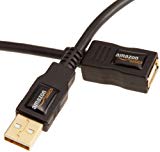


 Linear Mode


